Release Note Version 2.0

25 January 2026
New Features
(1) รองรับการส่งข้อมูลไปกรมสรรพากรด้วย Version 01.02.0000
ระบบรองรับการส่งข้อมูลไปยังกรมสรรพากรด้วย version 01.02.0000 พร้อมความสามารถเพิ่มเติมดังต่อไปนี้
- รองรับการส่งข้อมูล ตราสารกระดาษ (selectType = 1) โดยผู้ใช้งานสามารถนำเข้าข้อมูลที่มีหลายประเภทปะปนกันได้ ระบบจะทำการคัดแยกและประมวลผลข้อมูลโดยอัตโนมัติตาม selectType, typeCode และ ช่วงเวลาที่ต้อง submit สำหรับตราสาร อส.4ก และ อส.4ข
- รองรับการส่งข้อมูลไปกรมสรรพากรทั้ง version 01.01.0002 และ version 01.02.0000 โดยบริษัทที่ประสงค์จะใช้ version ใด จะต้องแจ้งให้ผู้ดูแลระบบทราบ สำหรับการส่งข้อมูลด้วย version 01.02.0000 ระบบจะทำการตรวจสอบความถูกต้องและจัดรูปแบบข้อมูลตามที่กรมสรรพากรกำหนด
- รองรับการกำหนด ชื่อไฟล์ชุดใบเสร็จ โดยใช้ prefix ที่อ้างอิงจากประเภทแบบ (formType)
- ปรับปรุงสูตรการคำนวณ ค่าปรับกรณียื่นเกินกำหนด (overdue) สำหรับตราสารกระดาษ (selectType = 1)
- รองรับการนำเข้าข้อมูลและคำนวณค่าอากรจากข้อมูล instAmount ที่เป็นส่วนเพิ่มเติม
(1) Support for Submission to the Revenue Department with Version 01.02.0000
The system now supports submission of data to the Revenue Department using version 01.02.0000, with the following additional capabilities:
- Supports submission of paper instruments (selectType = 1). Users may import mixed data, and the system will automatically separate and process records based on selectType, typeCode, and the required submission period for OS4A and OS4B instruments.
- Supports submission to the Revenue Department using both version 01.01.0002 and version 01.02.0000. Companies wishing to use a specific version must inform the system administrator. For submissions using version 01.02.0000, the system will validate and format the data in accordance with the Revenue Department’s specifications.
- Supports configuring the receipt batch file name using a prefix derived from the formType.
- Revised the overdue calculation formula for paper instruments (selectType = 1).
- Supports importing and calculating stamp duty from additional instAmount data.
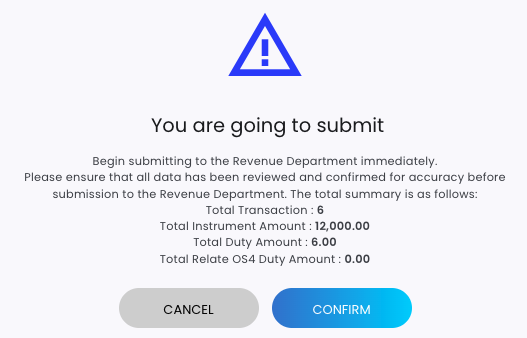
(2) การแสดงข้อความยืนยันความถูกต้องของข้อมูล
ระบบแสดงข้อความยืนยันความถูกต้องของข้อมูลเมื่อผู้ใช้งานกดปุ่ม Submit และ Submit Schedule เพื่อยืนยันก่อนทำการส่งข้อมูล
(2) Data Confirmation Messages
Displays confirmation messages to verify data accuracy when users click Submit or Submit Schedule.
(3) การระบุค่าอากรด้วยตนเอง
ผู้ใช้งานสามารถระบุ ค่าอากร และ ค่าอากรคู่ฉบับ เข้ามาเองได้ ในกรณีนี้ระบบจะ ไม่ทำการคำนวณค่าอากรและค่าอากรคู่ฉบับให้โดยอัตโนมัติ
(3) Manual Duty Amount Input
Users can manually submit stamp duty and duplicate stamp duty amounts. In this case, the system will not automatically calculate the stamp duty or duplicate duty.
(4) การปรับปรุงการแสดงผลหน้าจอ
มีการปรับปรุงการแสดงผลข้อมูลดังนี้
- หน้าจอ Batch List แสดงข้อมูล มูลค่าอากรคู่ฉบับ (dupDutyAmount) ควบคู่กับ มูลค่าอากร (dutyAmount)
- หน้าจอ Batch List จะไม่แสดงนามสกุลของไฟล์ที่นำเข้าในชื่อ Batch และเพิ่มข้อมูล typeCode, formType และ ช่วงเวลาการ submit ของแบบ อส.4ก และ อส.4ข ต่อท้ายชื่อ Batch เช่น
“GeStamp_TC6_DDA_b_6_OS4B_1H” โดย- 6 หมายถึง ตราสารประเภทที่ 6
- OS4B หมายถึง แบบ อส.4ข
- 1H หมายถึง ช่วงเวลาการ submit ครึ่งเดือนแรก
- หน้าจอ Batch Detail จะซ่อนปุ่ม Schedule Submit และป้ายข้อความ “Scheduled Submit Date” สำหรับ Batch ที่มีประเภทแบบเป็น OS4A และ OS4B
(4) User Interface Enhancements
The following display improvements have been implemented:
- On the Batch List screen, the duplicate duty amount (dupDutyAmount) is displayed alongside the stamp duty amount (dutyAmount).
- On the Batch List screen, the file extension of the imported file is removed from the batch name. Additionally, typeCode, formType, and the submission period for OS4A and OS4B are appended to the batch name, for example:
“GeStamp_TC6_DDA_b_6_OS4B_1H”, where:- 6 represents instrument type 6
- OS4B represents Form OS4B
- 1H represents the first half-month submission period
- On the Batch Detail screen, the Schedule Submit button and the label “Scheduled Submit Date” are hidden for batches with form types OS4A and OS4B.

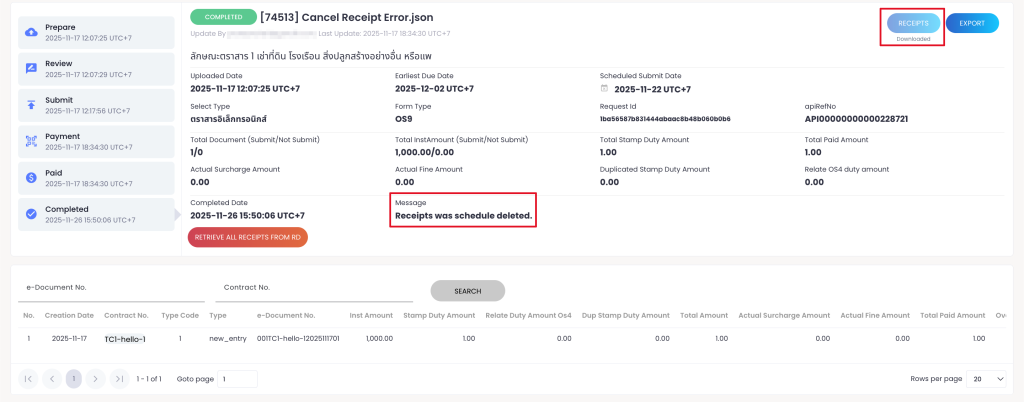
(5) การจัดการไฟล์ชุดใบเสร็จที่เกินระยะเวลาที่กำหนด
สำหรับไฟล์ชุดใบเสร็จที่เกินระยะเวลาที่ระบบกำหนด เมื่อระบบทำการลบไฟล์ชุดใบเสร็จแล้ว
- ปุ่ม “RECEIPT” บนหน้าจอ Batch Detail จะถูกซ่อน
ระบบจะแสดงข้อความ “Receipt was schedule deleted.”
(5) Receipt File Deletion Handling
For receipt batches that exceed the retention period, once the system deletes the receipt files:
- The “RECEIPT” button will be hidden on the Batch Detail screen.
The message “Receipt was schedule deleted.” will be displayed.
(6) การจัดการขนาดไฟล์ ZIP ชุดใบเสร็จ
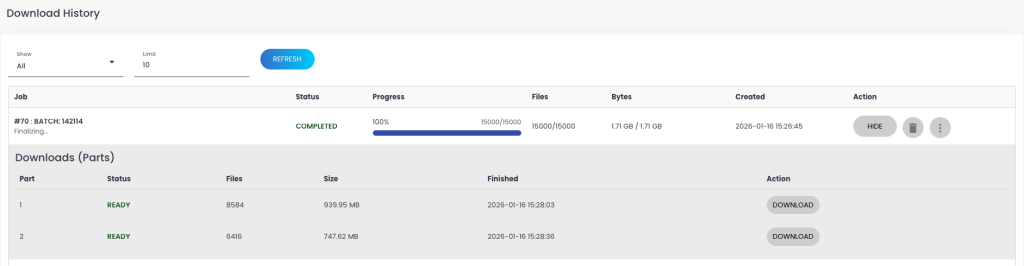
ระบบรองรับการแบ่งไฟล์ ZIP สำหรับชุดใบเสร็จที่ทำการ export โดยมีเงื่อนไขดังนี้
- โดยค่าเริ่มต้น ไฟล์ ZIP แต่ละไฟล์จะมีขนาดไม่เกิน 500 MB
ผู้ใช้งานสามารถแจ้งผู้ดูแลระบบเพื่อขอปรับเปลี่ยนขนาดไฟล์สูงสุดของ ZIP ได้
(6) Receipt ZIP File Size Management
Receipt files exported as ZIP files are now split automatically. By default:
- Default each ZIP file will not exceed 500 MB.
Users may contact the system administrator to request a different maximum ZIP file size.